

To loop a clip of yourself on your webcam, record a few seconds of yourself sitting normally, then play it on repeat as your camera while you step away for a moment. On Windows, FakeCam does this with its AFK mode: it records the loop, lines you up so the switch is invisible, and cuts back to your live camera when you return.
Video calls do not have a graceful way to say "back in two minutes". Turning your camera off draws attention, and staying frozen on a paused frame looks broken. A short presence loop of yourself is a calmer option for a quick, honest break. This guide explains what it is, how to set it up, how the seamless switch works, and where it is and is not appropriate.
What is a presence loop (AFK mode)?
A presence loop is a few seconds of you, recorded live, that plays on repeat as your camera. Because it is a real clip of you sitting at your desk, it looks like your normal camera rather than a frozen image or a black rectangle. FakeCam calls this AFK mode ("away from keyboard").
It is the same idea as looping a video as your webcam, except the clip is you, recorded on the spot, and the tool matches your live pose to the loop so nobody sees a jump when you leave or come back.
When would you use it?
The honest use is short, human breaks during a call where the camera is expected to stay on:
- Grab a coffee or some water without a visible camera-off in the middle of a long meeting.
- Answer the door or a knock for a minute.
- A quick bathroom break during an all-day workshop.
- Stretch or step out of frame briefly without the "why did your camera go off" moment.
It is for the couple of minutes when leaving cleanly is more distracting than helpful, not for pretending to attend something you are skipping.
How to loop yourself on webcam with FakeCam
On Windows, FakeCam records and plays the loop for you.
- Download FakeCam and register its virtual camera (a one-time click that asks for administrator permission).
- Open the AFK tab and record a few seconds of yourself sitting as you normally would. A faint outline of your last frame helps you line back up.
- In your meeting app, pick FakeCam as the camera.
- When you need a moment, press Step away. The loop plays as your camera. Press it again to cut back to your live camera when you return.
The preview shows exactly what the call sees, so you can check the loop looks natural before you rely on it.
How does the seamless switch work?
The awkward part of any loop is the moment it starts and stops. FakeCam records the loop and remembers the frame you were in, then shows a faint outline of that pose. When you press Step away, it starts the loop from a matching point, so the cut lines up with how you were sitting. Coming back, you align to the same outline and the switch back is just as clean. There is no crossfade or dissolve, just a matched cut, which is why it does not read as an effect.
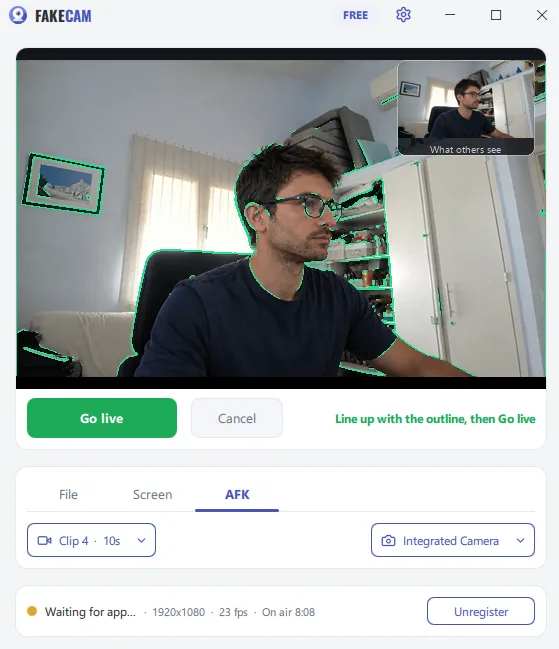
AFK mode vs a looping video vs a still image
There is more than one way to cover your seat. The honest comparison:
| Option | Looks like you | Live and current | Best for |
|---|---|---|---|
| AFK mode (loop of you) | Yes | Recorded on the spot | Short breaks where the camera is expected to stay on |
| A looping video file | Only if the video is you | No, it is a pre-made clip | Playing prepared footage as your camera |
| A still "be right back" image | No | No | Clearly signalling that you are away |
If your goal is to signal that you have stepped out, a still image or a real "be right back" card is the honest choice. AFK mode is for the opposite case: a short pause where you do not want to make a production of leaving and coming back.
Is this honest to use?
A presence loop is fine for short, real breaks, the same way muting yourself or turning your camera off is. What it should not be is a way to fake a full day of attendance, sit in on a meeting you are not actually following, or get around a rule. Some workplaces, interviews, exams and proctored tests specifically forbid virtual cameras, so respect those rules. FakeCam does not change your face or pretend to be someone else; it simply loops a clip of the real you for a few minutes.
Used for what it is meant for, AFK mode is a small courtesy: it keeps a call looking normal while you handle the quick, human interruptions that come up. Download FakeCam to set it up on Windows in a couple of minutes.