

Looking for a free ManyCam alternative on Windows? FakeCam streams any video or image as your webcam in Zoom, Microsoft Teams, Google Meet, Discord and OBS. It is free, needs no account, runs fully offline, and a one-time PRO upgrade (no subscription) unlocks more. Here is how it compares to ManyCam and how to switch in minutes.
Why look for a ManyCam alternative?
ManyCam is a capable virtual camera, but its full features sit behind a recurring subscription and it asks you to create an account. It is also a large toolkit built for live production. If all you need is to play a video or an image as your webcam, a lighter, free tool does the job without a monthly fee or a sign-up.
FakeCam: free and focused
FakeCam does one job well. It turns any video file or still image into a virtual camera that Zoom, Microsoft Teams, Google Meet, Discord, OBS and other apps treat as a normal webcam. It is free, needs no account, runs offline on Windows 10 and 11, and stays light on your system. A one-time PRO upgrade (no subscription) is there when you want more.
How to switch in under two minutes
- Download FakeCam and register its virtual camera with one click.
- Drag your video or image into the FakeCam window and press Play.
- In your meeting or streaming app, select FakeCam as the camera.
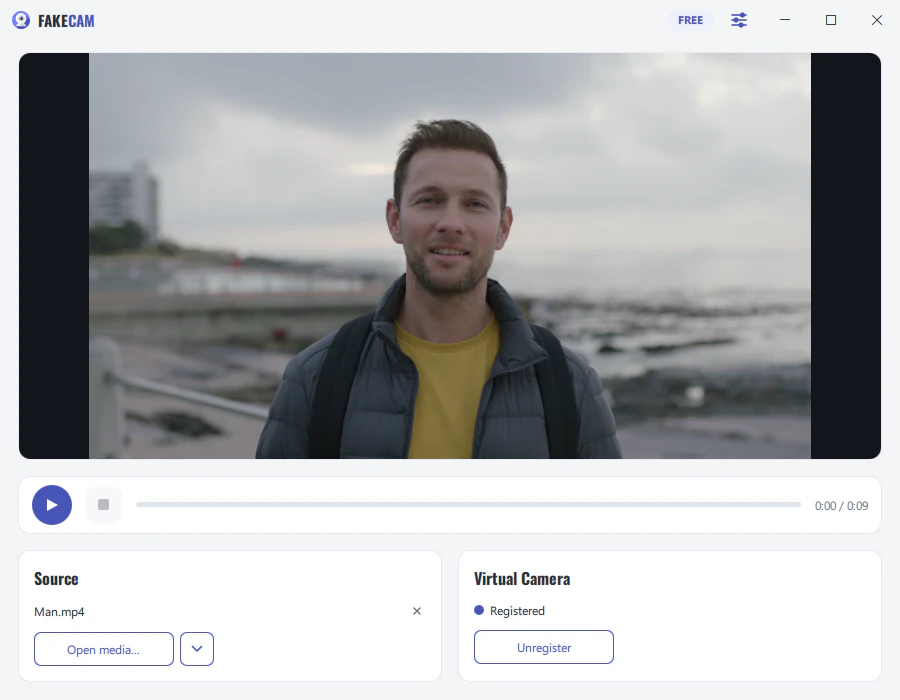
FakeCam vs ManyCam free at a glance
| Feature | FakeCam | ManyCam (free) |
|---|---|---|
| Price to unlock everything | One-time PRO purchase | Recurring subscription |
| Account or sign-up | Not needed | Required |
| Works in Zoom, Teams, Meet, Discord, OBS | Yes | Yes |
| Play a video as your webcam | Yes | Yes |
| Play a still image | Yes | Yes |
| Play an animated GIF or WebP as a loop | Yes | Not the focus |
| Loop a clip seamlessly | Yes | Yes |
| Rotate and mirror the source | Yes (0/90/180/270) | Yes |
| Output resolution up to 4K | Yes | Limited on free |
| Runs fully offline | Yes | Needs an account |
| Footprint | Light and focused | Heavier, many features |
| Windows 10 and 11 | Yes | Yes |
What ManyCam does that FakeCam does not
To be fair, ManyCam is a larger toolkit. If you need live face filters, several sources you switch between during a call, picture-in-picture, on-screen drawing or a built-in recorder, ManyCam or OBS will suit you better. FakeCam is deliberately simple: it sends the video or image you choose, in any app, for free. It does not add filters or effects.