To use a video as your webcam without OBS, install FakeCam, load your clip, press Play, and choose FakeCam as your camera in Zoom, Teams, Meet or Discord. It is a lightweight virtual camera, so you skip OBS scenes, sources and setup. Here is how, plus an honest look at when OBS is still the better tool.
Why skip OBS for this?
OBS Studio is a full live-production studio: scenes, sources, a mixer, and a virtual camera you start separately. That is a lot of setup if all you want is to play one video or image as your camera in a meeting. A dedicated virtual camera does just that in a few clicks, with a smaller footprint and nothing to configure.
Use a video as your webcam without OBS in 3 steps
- Install FakeCam and let it register its virtual camera.
- Open FakeCam, drag in your video, and press Play (turn on Loop to repeat it).
- In Zoom, Teams, Meet or Discord, pick FakeCam as the camera.
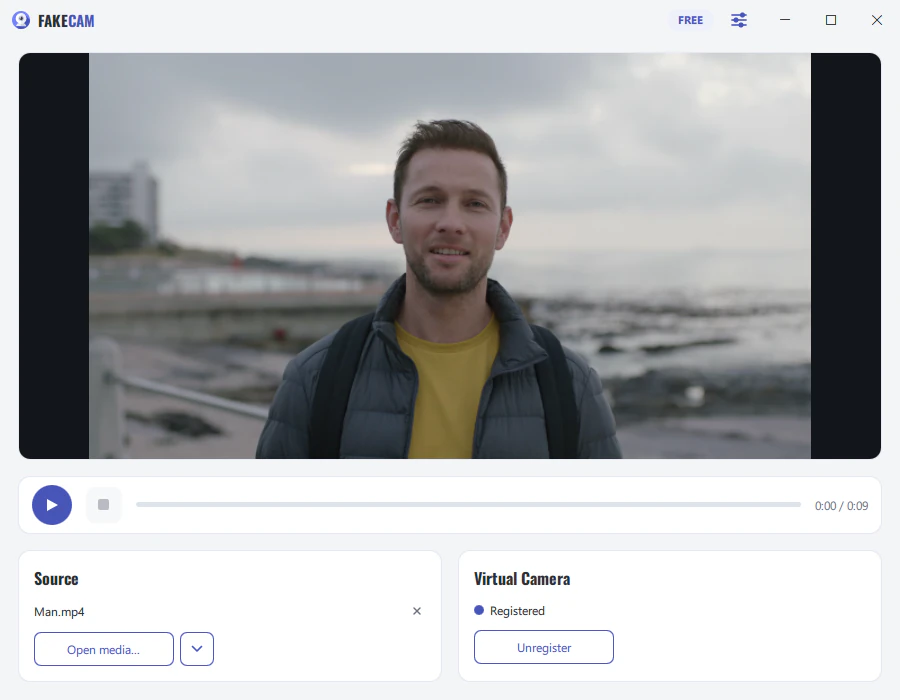
That is the whole flow. No scene, no media source, no separate virtual-camera button.
FakeCam vs OBS vs ManyCam
| Tool | Free | No watermark | Loops a video file | Works offline | Best for |
|---|---|---|---|---|---|
| FakeCam | Yes (personal use) | With PRO | Yes | Yes | Playing a video or image as your camera in calls |
| OBS Studio | Yes | Yes | Yes (Media Source) | Yes | Live streaming and mixing several sources |
| ManyCam | Free tier | No (watermark on free) | Yes | Yes | Live filters and effects |
Other lightweight loopers exist, and there are command-line tricks with ffmpeg, but most are either developer tools or add a watermark. FakeCam stays free for personal use and offline; its free version has a small watermark that a one-time PRO removes.
When OBS is still the better choice
Be honest about the job:
- Streaming to Twitch or YouTube? Use OBS. It is built to broadcast and to mix your camera, game, overlays and alerts.
- Mixing several sources live (camera plus slides plus screen)? OBS, or a tool like ManyCam.
- Live filters, face effects, green screen? ManyCam or OBS.
FakeCam does one thing: it sends a video or image to a virtual camera so any app that uses a camera can pick it up. If that is all you need, you do not need OBS.